Listing
[babe-listing]
Displays a list of booking items (tours, apartments, services, etc.) with dynamic filters. Commonly used for catalogs or selections like "Popular Tours" or "Recently Added Items". Example
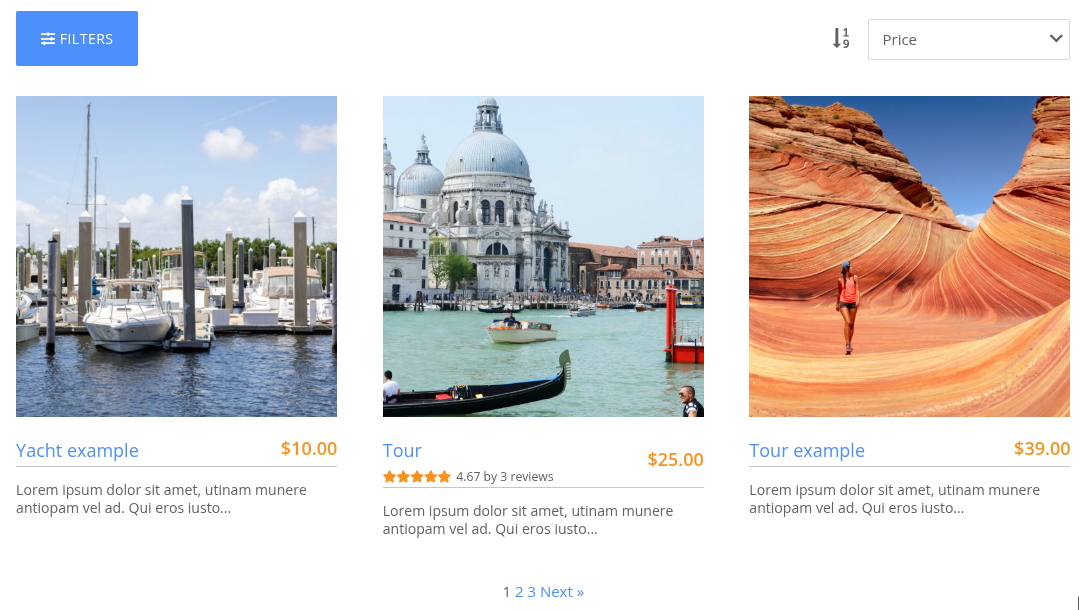
Parameters
All parameters are optional
Main options
title="Title of the listing"- text that appears at the top of the listingper_page="3"- number of booking items that are displayed per page. If not specified, the setting is taken from the taxonomy archive settings in BA Settings → General admin menupagination="0|1"- possible values: 0 (default) or 1; whether (1) or not (0) to add a pager to the bottom of the listdate_from="",date_to=""- show only those objects that have available dates in the specified range. Must be specified in the d/m/Y or m/d/Y format according to the Date format setting in BA Settings → General admin menuwith_sorting_option="0|1"- possible values: 0 (default) or 1; whether to display a drop-down sorting listcategory_ids="1,2,3"- IDs of booking categoriesterm_ids="1,2,3"- IDs of custom taxonomy termsids="1,2,3"- IDs of booking object postsfilter_taxonomies="1,2,3"- IDs of taxonomies that should be included in the dynamic filternot_scheduled="0|1"- display not scheduled booking items onlygroup_results_by_date="0|1"- possible values: 0 (default) or 1; whether (1) or not (0) to group search results by availability calendar dates. Typically used when sorting by availability date (av_date_from)without_av_check="0|1"- possible values: 0 (default) or 1; whether (1) or not (0) to skip booking item availability checkpost_author="1"- show only booking items from the author with this ID
Sort options
sort- sort by one of the following criteria:price_from- by price (default)rating- by ratepost_title- by booking item post titleav_date_from- by the nearest available datepost_date- by post creation datepost_modified- by post modified datemenu_order- by "sort order" option of the post
sortbyASC— ascending (default)DESC— descending
Style options
view="grid|full"- style of the booking item preview blocks: grid (default) or full (list)bg_img_id="",bg_img_url=""- set a background image for a listing section by specifying an image ID or URL from the site media libraryfa_icon=""- Font Awesome icon class to display an icon in the section header next to titleclasses=""- comma separated additional classes to add to the shortcode html
tip
More about shortcodes in the WordPress codex