Referral program
The referral program rewards existing customers (referrers) with loyalty points when people they invite (referrals) place an order. Each user gets a personal referral link they can share; new customers invited through that link are attributed to the referrer, and the referrer earns points once the referred customer's order is paid/completed.
The points awarded here land in the same balance used by Loyalty points, so referral rewards can be spent on future bookings just like points earned from orders.
Settings are located in the BA Settings → Referral admin menu.
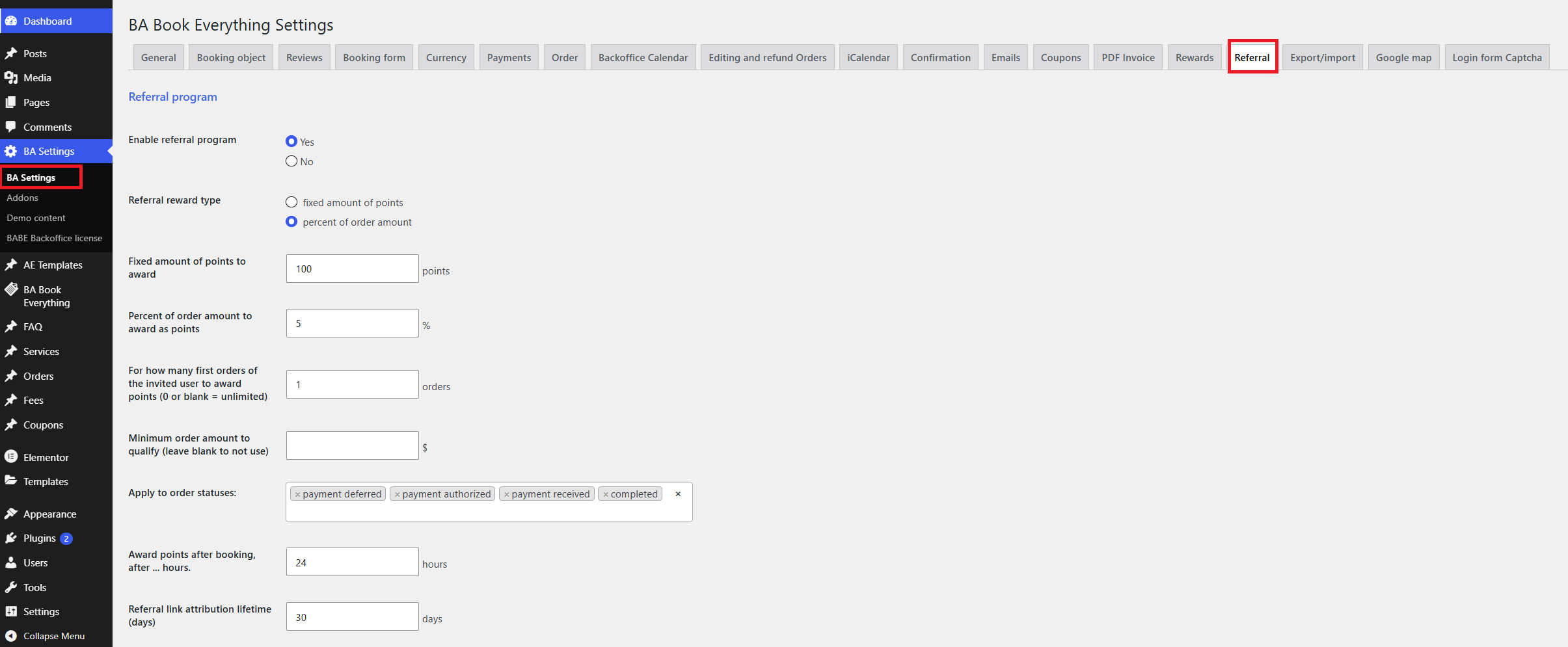
Settings
- Enable referral program — turn the whole program on or off
- Referral reward type — how the referrer is rewarded:
- fixed amount of points — a flat number of points per qualifying order
- percent of order amount — a percentage of the order total, converted to points using the points accrual rate
- Fixed amount of points to award — used when the reward type is fixed amount of points
- Percent of order amount to award as points — used when the reward type is percent of order amount
- For how many first orders of the invited user to award points — limit payouts to the referred customer's first N orders.
0or blank means unlimited (every qualifying order pays out) - Minimum order amount to qualify — orders below this total don't trigger a reward. Leave blank to reward on any spent amount
- Apply to order statuses — which order statuses count as "qualifying" (e.g. payment received, completed). The reward is evaluated when an order reaches one of these statuses
- Award points after booking, after … hours — a waiting period before points are granted.
0awards immediately; a positive value defers the payout (processed by the hourly cron), which gives you a window to catch cancellations before paying out - Referral link attribution lifetime (days) — how long the referral cookie is kept, i.e. how long after clicking the link a registration/order still counts toward the referrer
- Referral rules page (linked from My Account) — a page describing the program rules, linked from the customer account area
- Share button label / label after link is copied — the text shown on the "Share" button on booking pages, before and after the link is copied to the clipboard
Email notifications
- Send email to referrer when points are awarded — notify the referrer each time they earn points
- Send email to referrer when points are revoked — notify the referrer if an order is cancelled/refunded and their points are removed
- Send email to admin when a new customer registers via referral link — alert the site admin about new referred sign-ups
- Admin email for referral notifications — recipient for the admin notifications. Leave blank to use the site admin email
How referral program works
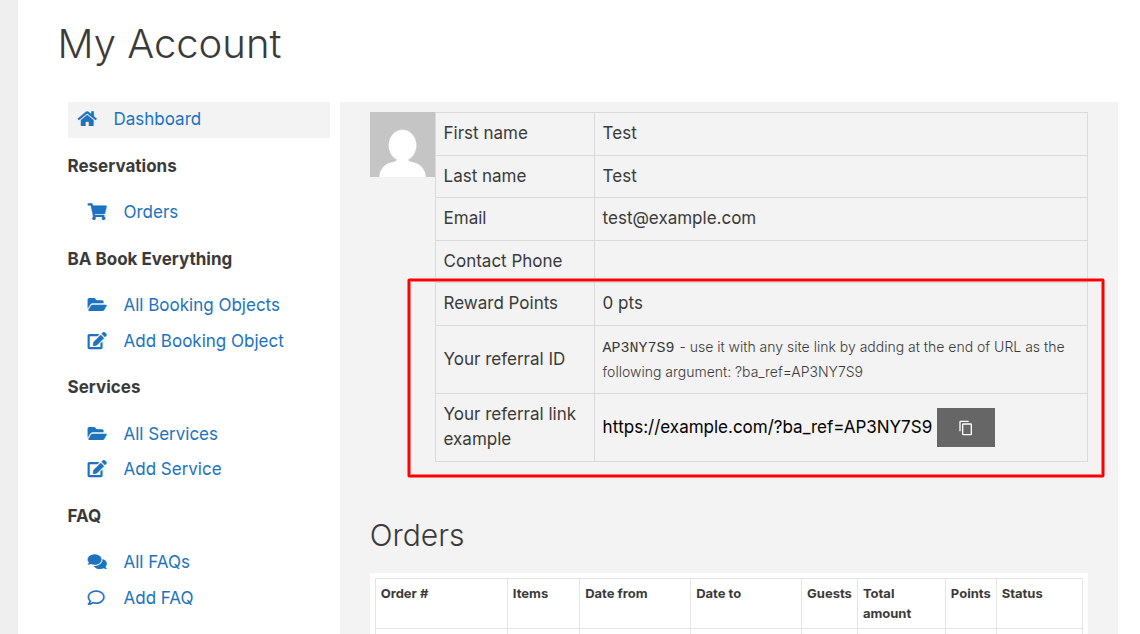
- Every registered user has a unique referral code and link, shown on their My Account page (with a copy button). The code is generated automatically the first time it's needed
/my-account
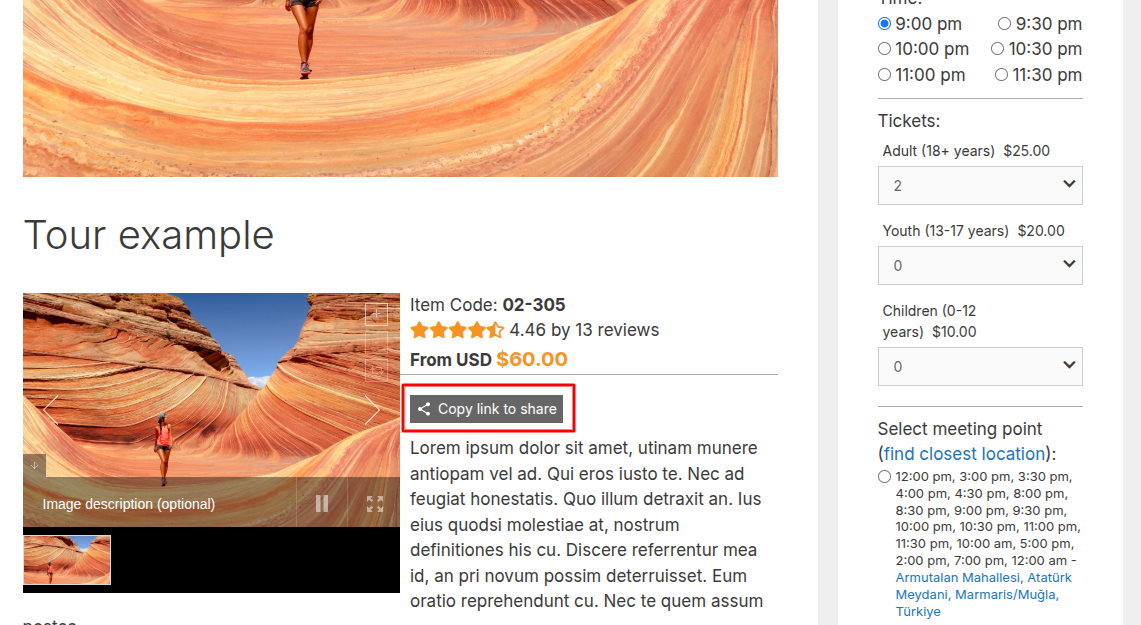
- Customers can also share a specific booking via the "Share with referral link" button on a booking item's public page. This button can be toggled on/off per booking object in the booking's admin settings
/tour
- When a new visitor opens a referral link (
?ba_ref=CODE), a cookie attributes them to the referrer for the configured lifetime, and the parameter is removed from the URL. Visits to your own link (self-referrals) are ignored - When that visitor becomes a customer — through registration or a guest checkout that creates an account — they are linked to the referrer, and (optionally) the admin is notified
- When the referred customer's order reaches a qualifying status and meets the minimum amount, the reward is either granted immediately or scheduled after the waiting period
- Points are calculated from the reward type (fixed, or a percent of the order converted via the accrual rate) and added to the referrer's balance. Each referred customer only pays out for their first N orders, per the limit setting
- If a rewarded order is cancelled or refunded, the points are automatically revoked from the referrer and the customer's payout slot is freed so a later order can qualify instead
Admin views
- Order page — when an order belongs to the referral program, the order metabox shows a Referrer row with the referrer's name, the payout status (pending / awarded N pts), their referral link, how many customers they've referred, and their total earned referral points
- User profile — each user's WordPress profile has a referral section showing their code, link and stats
/wp-admin/profile.php
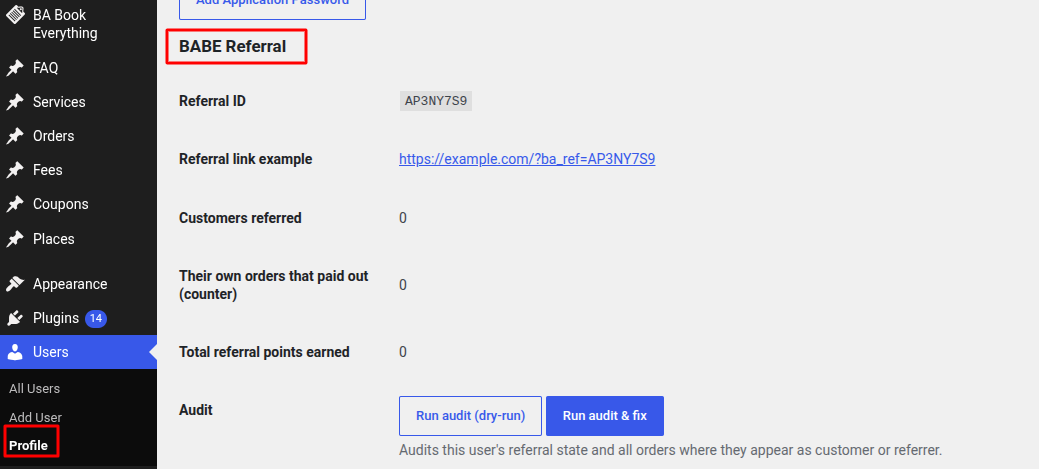
An audit tool on the user profile page lets the administrator re-check and fix a user's referral state against their actual referred orders. It detects and repairs inconsistencies such as orders marked rewarded but missing data, referrers pointing to deleted users, points not rolled back on cancelled orders, duplicate referral codes, and leftover legacy counters